
Historical DataBase Plugins Overview
Historical Database Plugins
This plugin enables you to build custom historical database plugins for Stream Server using the new SDK-style plugin system. It covers the architecture, lifecycle, configuration, data access, insert/query operations, error handling, deployment, and a step-by-step tutorial.
What is a Historical Database Plugin?
- A plugin is a .NET class that implements IHistoricalDatabasePlugin and handles storing and retrieving historical tag data to/from custom databases (e.g., PostgreSQL, InfluxDB, TimescaleDB, MongoDB, custom time-series databases).
- The plugin references only Stream.Common.Shared, keeping it decoupled from the Stream Server host.
Architecture Overview
Interfaces & Base Classes (defined in Stream.Common.Shared)
- IHistoricalDatabasePlugin: Core contract with Initialize(), InsertTVSDataAsync_trans2_Detailed(), InsertTVSDataAsync_transPeriodicCompact(), GetHistoricalTagValuesAsync_Detailed(), GetHistoricalTagValuesAsync_Compact(), GetLastRecordAsync_Compact(), CheckToDeleteOldRecords(), Disconnect(), DisplayName, and Version.
- HistoricalDatabasePluginBase: Optional abstract base class providing helper methods, configuration management, and default implementations (recommended).
- Data Contracts:
- LogStruct (contains list of TagValueStatus for writes)
- TrendData (single tag time-series data for reads)
- TrendDataBio (multi-tag time-series data for reads)
- FnResponse<T> (operation result with data)
Creating the plugin
All data destination plugins inherit from HistoricalDatabasePluginBase
public class MyPlugin : HistoricalDatabasePluginBase
{
// Get helper methods, only override what you need
}
- Loader
The host discovers plugin types from DLLs inside application folder\Plugins
- Design-time
The Historical Model editor lets users choose a plugin type and configure its public writable properties. Values are stored as strings and converted to target property types at runtime.
- Runtime
The host instantiates the plugin, applies settings via reflection, calls SetModelAndFolderPath(), calls Initialize(), then repeatedly calls insert methods with tag data, and responds to query requests for historical data retrieval.
Plugin Lifecycle in the Host (Stream Sever)
- Discover and instantiate IHistoricalDatabasePlugin
- Apply settings via reflection to the plugin's public writable properties from the configuration dictionary
- Call SetModelAndFolderPath() to provide the HistoricalModel and default storage folder path
- Call ValidateConfiguration() (if plugin inherits from HistoricalDatabasePluginBase)
- Call Initialize() on first write operation (lazy initialization pattern)
- During operation:
- Write: Call InsertTVSDataAsync_trans2_Detailed() or InsertTVSDataAsync_transPeriodicCompact() with batched tag data
- Read: Call GetHistoricalTagValuesAsync_Detailed(), GetHistoricalTagValuesAsync_Compact(), or GetLastRecordAsync_Compact() for data retrieval
- Maintenance: Call CheckToDeleteOldRecords() periodically to remove old data
Settings and Placeholder Substitution
- Users configure your plugin in the Database plugin Editor. The grid displays your public writable properties.
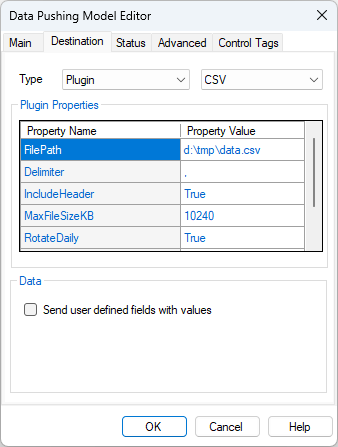
Data Access and Push Operations
Write Operations
- Detailed Mode (one row per tag per timestamp):
public override async Task InsertTVSDataAsync_trans2_Detailed(List<LogStruct> lstLogStruct)
- Each LogStruct contains lstTVS (List of TagValueStatus)
- Each TagValueStatus has: TagName, RawValue, ScaledValue, Status, ComStatus, TimeStamp, MsgSource
- Store each tag value as a separate record
- Compact Mode (all tags in one row per timestamp):
public override async Task InsertTVSDataAsync_transPeriodicCompact(List<LogStruct> lstLogStruct)
- Each LogStruct contains lstTVS (List of TagValueStatus) for all tags at a single timestamp
- Store as a wide table with one column per tag
Read Operations
Detailed Query (single tag):
public override async Task<FnResponse<List<TrendData>>> GetHistoricalTagValuesAsync_Detailed(
string tagName, string startDate, string endDate, string aggregation, string groupBy)
- Return FnResponse with List<TrendData> (timestamp + value pairs)
- Support aggregations: "RT" (no aggregation), "avg", "sum", "min", "max", "count", "consumption"
- Support grouping: "ms", "second", "minute", "hour", "day", "month", "year"
Compact Query (all tags):
public override async Task<FnResponse<List<TrendDataBio>>> GetHistoricalTagValuesAsync_Compact(
string startDate, string endDate, string aggregation, string groupBy)
Return FnResponse with List<TrendDataBio> (timestamp + all tag values)
Maintenance Operations
public override async Task CheckToDeleteOldRecords(int numDays)
Delete records older than numDays to manage database size
Storage Path Handling
- The plugin receives HistoricalModel which contains:
- StorageFolderPath: Custom folder path (if user specified)
- ModelName: Used as database/file name
- Pattern (same as built-in SQLite)
private string GetDatabasePath()
{
// If custom path is empty, use default historical folder
string folderPath = string.IsNullOrWhiteSpace(_model.StorageFolderPath)
? _historicalFolderPath
: _model.StorageFolderPath;
return Path.Combine(folderPath, $"{_model.ModelName}.db");
}
Lazy Initialization Pattern
Follow the built-in pattern: Initialize on first write, not on first read
public override async Task InsertTVSDataAsync_trans2_Detailed(List<LogStruct> lstLogStruct)
{
// Lazy initialization on first write
if (!_isReady)
{
await Initialize();
}
// ... perform insert
}
Error Resilience
- The host guards plugin boundaries (Initialize/Insert/Query/Disconnect) with try/catch and can disable a faulted database to avoid repeated errors.
- Best practice: handle exceptions inside your own functions and return proper FnResponse objects with error details:
return new FnResponse<List<TrendData>>
{
IsOK = false,
ErrorMsg = $"Query failed: {ex.Message}",
Data = new List<TrendData>()
};
Configuration Properties
Use DefaultValueAttribute and DescriptionAttribute for all public properties:
[DefaultValue("historical.db")]
[Description("Name of the database file")]
public string DatabaseFileName { get; set; } = "historical.db";
[DefaultValue(100000)]
[Description("Cache size in KB for performance optimization")]
public int CacheSizeKB { get; set; } = 100000;
These attributes enable the UI to display default values and descriptions to users.