
Page Scripts
1. Overview
Page Scripts is a powerful feature in the Stream platform that allows you to execute JavaScript code at the page level. This functionality provides comprehensive control over dashboard behavior, enabling custom logic, data processing, and interactive features that go beyond individual component capabilities.
This feature is particularly effective for:
- Page Initialization: Set up page-specific data and configurations when the page loads
- Real-time Processing: Execute continuous monitoring and data processing tasks
- User Interactions: Handle complex user interactions and workflows
- Data Integration: Connect to external APIs and process data from multiple sources
- Custom Logic: Implement business rules and custom algorithms
- Page Lifecycle Management: Handle page opening, closing, and cleanup operations
Key Features
- Multiple Script Types: OnLoad, OnOpen, OnClose, and Loop scripts
- Asynchronous Execution: Non-blocking script execution with proper resource management
- Stream Integration: Full access to Stream built-in functions and platform APIs
- Resource Management: Automatic cleanup of intervals, timeouts, and event listeners
- Debug Support: Comprehensive debugging and error logging capabilities
- Security Sandbox: Safe execution environment with code sanitization
- Page State Management: Access to page state and lifecycle information
📚 View Stream Built-in Functions Documentation
2. Configuration Steps
2.1 Basic Configuration
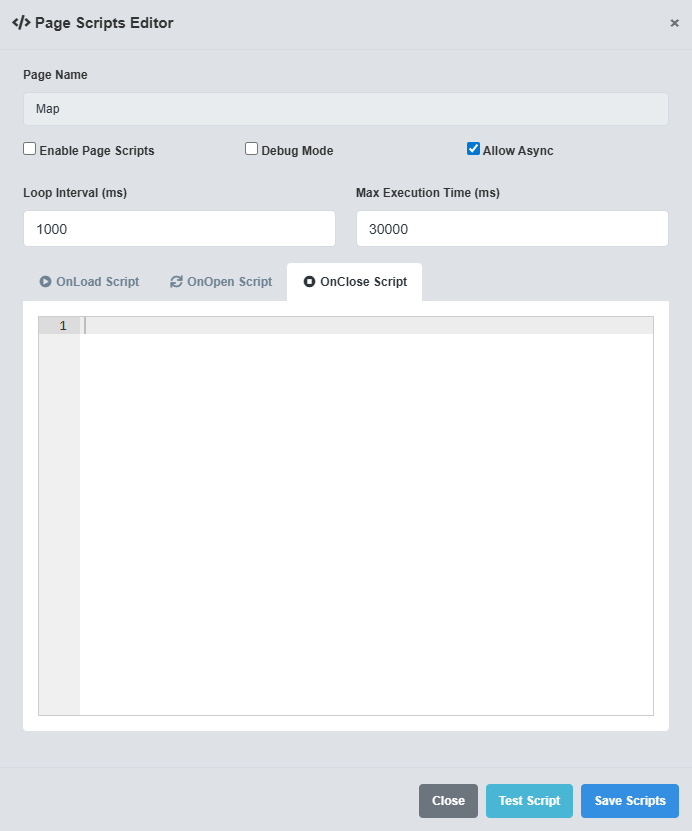
Basic Configuration tab showing page name and enable/disable settings for Page Scripts.
The Basic Configuration tab controls the fundamental settings for Page Scripts.
|
Parameter |
Description |
Format/Options |
Example |
|
Page Name |
Name of the dashboard page for script execution |
Text string (must match dashboard page name) |
Production_Dashboard |
|
Is Enabled |
Enable or disable script execution for this page |
true/false |
true |
Page Name Matching: The Page Name must exactly match the name of the dashboard page where you want the scripts to execute. This ensures scripts run on the correct page.
2.2 Script Types
The Script Types tab allows you to configure different types of scripts for various page lifecycle events.
|
Script Type |
Description |
When Executed |
Use Cases |
|
OnLoad Script |
Executed when the page is first loaded |
Once per page load |
Initialization, setup, data loading |
|
OnOpen Script |
Executed when the page is opened/activated |
Every time page becomes active |
Refresh data, update displays, user notifications |
|
OnClose Script |
Executed when the page is closed/deactivated |
Every time page becomes inactive |
Cleanup, save data, stop processes |
Script Execution Order: Scripts execute in the following order: OnLoad → OnOpen → Loop (repeatedly) → OnClose. Each script type serves a specific purpose in the page lifecycle.
// Example OnLoad Script console.log('Page loaded: ' + Stream.System.GetCurrentPage()); Stream.UI.ShowNotification('Dashboard initialized', 'success'); // Example OnOpen Script const currentUser = Stream.System.GetCurrentUser(); console.log('Page opened by: ' + currentUser); // Example OnClose Script console.log('Page closing, cleaning up resources'); Stream.UI.ShowNotification('Page closed', 'info'); // Example Loop Script const temperature = Stream.Tag.GetValueNum('Temperature.Value'); if (temperature > 80) { Stream.UI.ShowNotification('High temperature warning!', 'warning'); }
2.3 Execution Settings
The Execution Settings tab controls how scripts are executed and managed.
|
Parameter |
Description |
Format/Options |
Example |
|
Loop Interval |
Time interval between loop script executions (milliseconds) |
Number (minimum 100ms recommended) |
1000 |
|
Max Execution Time |
Maximum time allowed for script execution (milliseconds) |
Number (timeout protection) |
30000 |
|
Allow Async |
Allow asynchronous script execution |
true/false |
true |
Performance Considerations: Set appropriate loop intervals to balance responsiveness with performance. Avoid intervals less than 100ms to prevent excessive CPU usage.
3. Stream Built-in Functions
Page Scripts provide full access to the Stream Built-in Functions library, enabling comprehensive platform integration. All functions are available through the Stream object:
Tag Operations
Read and write tag values, check tag existence, and manage data connections.
Navigation
Navigate between dashboards, refresh pages, and open external URLs.
UI Functions
Show notifications, confirmations, prompts, and other user interface elements.
Utilities
Format numbers, dates, perform math operations, and manage timing functions.
System Info
Get current user, page name, and page state information.
📚 View Complete Stream Functions Documentation
4. Security Features
⚠️ Security Notice: Page Scripts include comprehensive security features to protect your dashboard from malicious code. All user input is sanitized and executed in a controlled environment.
Code Sanitization
The Page Scripts system automatically sanitizes all JavaScript code to prevent:
- Script Injection: Removes dangerous script patterns and event handlers
- XSS Attacks: Sanitizes code to prevent cross-site scripting
- Resource Access: Prevents unauthorized access to system resources
- Infinite Loops: Implements execution time limits to prevent runaway scripts
Execution Sandbox
Scripts run in a sandboxed environment with:
- Resource Tracking: Automatic cleanup of all created resources
- Time Limits: Maximum execution time to prevent hanging
- Error Handling: Graceful error handling and logging
- Access Controls: Restricted access to dangerous global objects
Page State Management
Each page maintains its own execution context with:
- Isolated Execution: Scripts don't interfere with other pages
- State Tracking: Monitor page load status and uptime
- Resource Isolation: Resources are tracked per page
- Cleanup on Close: Automatic cleanup when page is closed
5. Troubleshooting
Common Issues and Solutions
|
Issue |
Possible Causes |
Solutions |
|
Loop scripts running too frequently |
Loop interval set too low |
Increase Loop Interval to at least 1000ms (1 second) |
|
Scripts timing out |
Script execution time exceeds Max Execution Time |
Optimize script code, increase Max Execution Time, or break into smaller functions |
|
Memory leaks |
Resources not properly cleaned up |
Use Stream.Utils.Repeat() and Stream.Utils.Delay() for automatic cleanup |
|
Stream functions not working |
Function not available, incorrect syntax |
Check function availability, verify syntax, enable debug mode |
|
Scripts interfering with each other |
Global variable conflicts, resource conflicts |
Use page-specific namespaces, avoid global variables |