
GUI Plugins Overview
Client GUI Plugins
This plugin enables you to build custom UI plugins for Stream SCADA Client using the new SDK-style plugin system. It covers the architecture, lifecycle, configuration, tag access, update loop, error handling, deployment, and a step-by-step tutorial.
What is a GUI Plugin?
- A plugin is a .NET class that implements IPluginView and returns a WinForms Control (typically a UserControl) that the host places onto a diagram at runtime.
- The plugin references only Stream.Common.Shared, keeping it decoupled from the Stream GUI host.
Architecture Overview
Interfaces & Base Classes (defined in Stream.Common.Shared)
- IPluginView: Core contract with Initialize(IHostServices) and GetControl() As Control
- PluginViewBase: Optional abstract base class providing helper methods and lifecycle hooks (for programmatic plugins only)
- IHostServices: Host-provided services for plugins
- ITagService: Read/write/subscribe to SCADA tags
Plugin Approaches
- Option 1: UserControl-based (Recommended for Designer Support)
public class MyPlugin : UserControl, IPluginView
{
// Use WinForms designer, implement interface directly
}
- Option 2: Programmatic (Inherit from PluginViewBase)
public class MyPlugin : PluginViewBase
{
// Get helper methods, but no designer support
}
- Loader
The host discovers plugin types from DLLs inside application folder\Plugins\[SubfolderName]\.
- Design-time
The GUI Plugin editor lets users choose a plugin type and configure its public writable properties. Values are strings and converted to target property types at runtime.
- Runtime
the host instantiates the plugin, injects IHostServices, applies settings with dictionary substitution.
Plugin Lifecycle in the Host (Stream Client)
- Discover and instantiate IPluginView
- Call plugin.Initialize(hostServices)
- Call plugin.GetControl() and add the returned Control to the diagram overlay
- Apply settings via reflection to the control's public writable properties. The host substitutes values using the Dynamic Parameters, then sets matching public properties by name
- Call optional lifecycle method OnLoad() (if plugin inherits from PluginViewBase)
- Each cycle, the host tries to call (if present): PluginUpdate()
Code Examples
C# Example (UserControl-based)
using System.Windows.Forms;
using Stream.Common.Shared;
// Note: Inherits UserControl for designer support, implements IPluginView directly
// Cannot inherit from PluginViewBase due to single inheritance limitation
public class UserControl1 : UserControl, IPluginView
{
private IHostServices _host;
// Public properties for configuration
public string u1 { get; set; }
public string u2 { get; set; }
public string u3 { get; set; }
public void Initialize(IHostServices host)
{
_host = host;
// Initialization logic here
}
public Control GetControl()
{
return this;
}
// Optional: Called by host each cycle
public void PluginUpdate()
{
// Update UI based on tag values
}
// Rest of your code...
}
VB.NET Example (UserControl-based)
Imports System.Windows.Forms
Imports Stream.Common.Shared
' Note: Inherits UserControl for designer support, implements IPluginView directly
' Cannot inherit from PluginViewBase due to single inheritance limitation
Public Class UserControl1
Inherits UserControl
Implements IPluginView
Private _host As IHostServices
' Public properties for configuration
Public Property u1 As String
Public Property u2 As String
Public Property u3 As String
Public Sub Initialize(host As IHostServices) Implements IPluginView.Initialize
_host = host
' Initialization logic here
End Sub
Public Function GetControl() As Control Implements IPluginView.GetControl
Return Me
End Function
' Optional: Called by host each cycle
Public Sub PluginUpdate() Implements IPluginView.PluginUpdate
' Update UI based on tag values
End Sub
' Rest of your code...
End Class
C# Example (Programmatic with PluginViewBase)
using System.Windows.Forms;
using Stream.Common.Shared;
// For programmatic plugins that don't need designer support
public class MyCustomPlugin : PluginViewBase
{
private Label _label;
public override void Initialize(IHostServices host)
{
base.Initialize(host); // Important: call base
// Create UI programmatically
_label = new Label { Text = "Hello", Dock = DockStyle.Fill };
}
public override Control GetControl()
{
return _label;
}
// Optional: Override lifecycle hooks
protected override void OnLoad()
{
base.OnLoad();
// Called after settings are applied
}
// Optional: Override update loop
public override void PluginUpdate()
{
// Use helper methods from base class
var value = SafeReadTag("MyTag");
_label.Text = value?.ToString() ?? "N/A";
}
}
Important Notes
- Single Inheritance Limitation: VB.NET/C# classes can only inherit from one base class. Since UserControl is already a base class, you cannot also inherit from PluginViewBase. This is why most plugins implement IPluginView directly.
- Backward Compatibility: Both approaches are fully supported. Existing plugins continue to work without changes.
- Extensibility: New helper methods can be added to PluginViewBase in the future without breaking existing plugins.
Settings and Placeholder Substitution
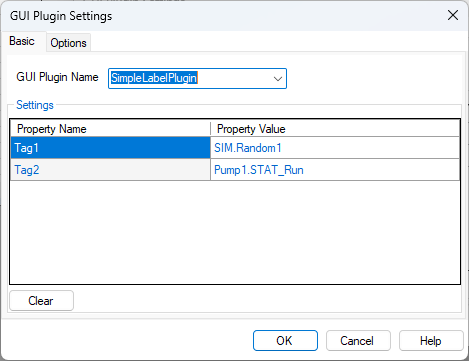
- Users configure your plugin in ConfGUIPlugin. The grid displays your public writable properties.
Tag Access
- Use _host.Tags after Initialize:
ReadValue(tagName As String) returns the current value of a single tag.
ReadValues(tagNames As IEnumerable(Of String)) returns a Dictionary of tag names to values.
WriteValue(tagName As String, value As Object) writes a value to a tag.
Update Loop Contract
- The host attempts a parameterless method PluginUpdate() if present
Error Resilience
- The host guards plugin boundaries (Initialize/GetControl/PluginUpdate/Read/Write) with try/catch and can disable a faulted control to avoid repeated errors.
- Best practice: also handle exceptions inside your own functions to keep your control healthy.