
Integration Plugins Overview
Data Integration Destination Plugins
This plugin enables you to build custom data destination plugins for Stream SCADA Server using the new SDK-style plugin system. It covers the architecture, lifecycle, configuration, data access, push operations, error handling, deployment, and a step-by-step tutorial.
What is an Integration Data Destination Plugin?
- A plugin is a .NET class that implements IDataDestinationPlugin and handles pushing tags data to custom destinations (e.g., Kafka, Azure IoT Hub, custom databases, CSV files).
- The plugin references only Stream.Common.Shared, keeping it decoupled from the Stream Server host.
Architecture Overview
Interfaces & Base Classes (defined in Stream.Common.Shared)
- IDataDestinationPlugin: Core contract with Initialize(), PushDataAsync(), Disconnect(), DisplayName, and Version
- DataDestinationPluginBase: Optional abstract base class providing 15+ helper methods and default implementations (recommended)
- Data Contracts: LogStruct (contains list of TagValueStatus) and PluginResponse (operation result)
Creating the plugin
All data destination plugins inherit from DataDestinationPluginBase
public class MyPlugin : DataDestinationPluginBase
{
// Get helper methods, only override what you need
}
- Loader
The host discovers plugin types from DLLs inside application folder\Plugins
- Design-time
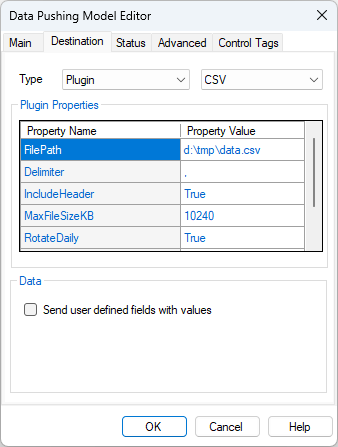
The Data Integration editor lets users choose a plugin type and configure its public writable properties. Values are strings and converted to target property types at runtime.
- Runtime
The host instantiates the plugin, applies settings with dictionary substitution, calls Initialize(), then repeatedly calls PushDataAsync() with tag data.
Plugin Lifecycle in the Host (Stream Sever)
- Discover and instantiate IDataDestinationPlugin
- Apply settings via reflection to the plugin's public writable properties, then sets matching public properties by name
- Call Initialize()
- Call optional ValidateConfiguration() (if plugin inherits from DataDestinationPluginBase)
- Each cycle, the host calls PushDataAsync(data) with a list of LogStruct objects containing tag values
- On shutdown or job stop, call Disconnect()
Settings and Placeholder Substitution
- Users configure your plugin in the Data Puhsing Editor. The grid displays your public writable properties.
Data Access and Push Operations
• In PushDataAsync(data), cast each item to LogStruct:
- LogStruct contains lstTVS (List of TagValueStatus)
- Each TagValueStatus has: TagName, RawValue, ScaledValue, Status, ComStatus, TimeStamp, MsgSource
• Return a PluginResponse with:
- IsSuccess (Boolean)
- Message (String)
- ErrorDetails (String)
Push Operation Contract
• The host calls PushDataAsync(data) periodically with batched tag data.
• Your plugin should process the data asynchronously and return a PluginResponse indicating success or failure.
Error Resilience
• The host guards plugin boundaries (Initialize/PushDataAsync/Disconnect) with try/catch and can disable a faulted destination to avoid repeated errors.
• Best practice: also handle exceptions inside your own functions to keep your plugin healthy and return proper PluginResponse objects with error details.