
OPC UA
Stream SCADA can be an OPC UA Client to any OPC UA Server
From Stream Explorer, select Data Sources and click on the Add button.
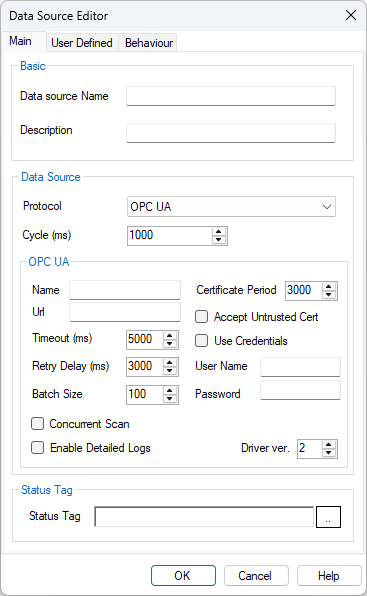
OPC UA Client Data Source Settings
• Name: Unique name for the data source.
• URL: OPC UA server endpoint URL. Example: opc.tcp://192.168.1.10:4840
• Certificate Period: Period (in months) after which the client certificate is renewed. Default is 12.
• Accept Untrusted Certificates: If checked, the client will accept untrusted or self-signed certificates from the OPC UA server.
• Use Credentials: Enables authentication using username and password.
– User Name: OPC UA server user name.
– Password: OPC UA server password.
• Retry Delay: Delay (ms) before retrying a failed connection. Default is 5000.
• Timeout: Timeout (ms) for communication requests. Default is 5000.
• Concurrent Scan: If enabled, multiple concurrent scans will be established with the OPC UA server (for scalability).
• Batch Size: Maximum number of items (tags) requested in a single batch read. Default is 100.
• Detailed Logs: If checked, detailed logs will be written for debugging.
• Driver Version: Internal version number of the OPC UA driver. Default is 1.