
BACnetIP
Stream SCADA can be a BACnetIP Client/Master to any BACnetIP Device.
From Stream Explorer, select Data Sources and click on the Add button.
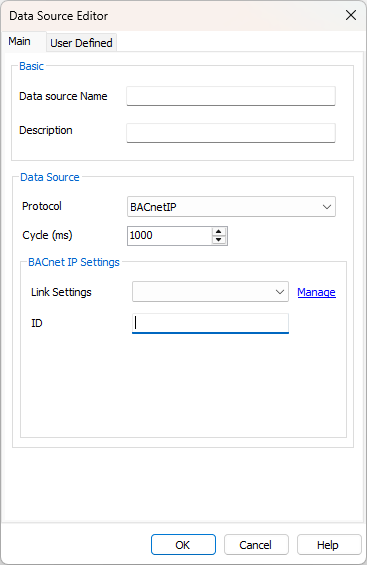
- Name: Unique name for the data source.
- Description: Optional information about the data source.
- Protocol: Selecting BACnet means that Stream SCADA is a Client/Master that will communications with BACnet devices.
- Link Settings: Communication link that this BACnet Device belongs to. (more on that later).
- ID: BACnet Device ID
Step 1: Connection
How to manage connections?
1. Click on "Manage".
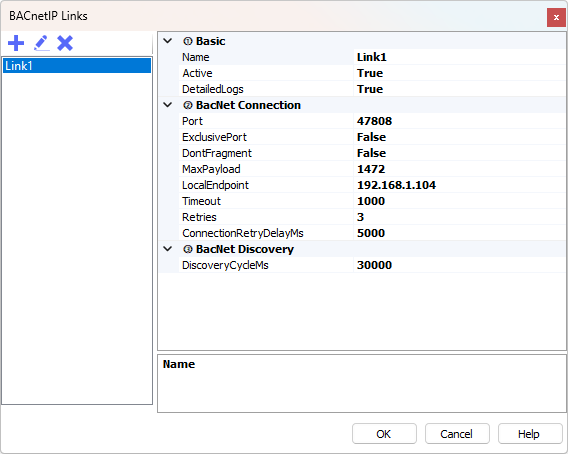
2. Add a new connection using the + button. And fill the required details.
BACnet Link Settings
Link settings are used to configure the BACnet/IP communication and discovery behavior. A BACnet link represents the connection between Stream SCADA and devices available on the BACnet network.
- Basic
Name: Enter a suitable name for the link.
Active: If False, the BACnet Link won’t start.
Detailed Logs: If True, traffic details and diagnostic messages can be viewed in Console and logs.
- BACnet Connection
- Port: The UDP port number for BACnet/IP communication (default = 47808).
- Exclusive Port: If True, the port will be bound exclusively by this link. If multiple BACnet clients are running on the same machine, set this to False.
- Don’t Fragment: If True, the “Don’t Fragment” flag will be set on outgoing IP packets. Useful in routed networks or VPN environments where fragmentation must be avoided.
- Max Payload: Maximum payload size for BACnet packets (default = 1472). Adjust according to MTU size of the network.
- Local Endpoint: Local IP address to bind the BACnet communication. Leave blank to bind to all interfaces.
- Timeout: Communication timeout in milliseconds when waiting for device responses (default = 1000).
- Retries: Number of retry attempts for a failed request (default = 3).
- Connection Retry Delay (ms): Delay in milliseconds between consecutive connection attempts (default = 5000).
3. BACnet Discovery
- Discovery Cycle (ms): Interval in milliseconds for device discovery. Defines how often StreamControls sends Who-Is requests to detect available BACnet devices (default = 5000).